How to Manage a Content Team Without Living on Zoom: Our 3 Systems
Part two of how my agency works. The org chart shows who does what. These three systems make the people actually work together, with five calls a month.
 By Evgeny Maximov·9 min read·
If you want to grow on socials, you need people on board. Sorry, AI agents won't replace them. And once you have people, you need them to work together without you managing every step.
This is part two of how my agency works. In part one I showed the org chart: the producer, the line producer, editors, a designer, an account manager. It looks nice, a lot of shapes and arrows. Here's how to actually make them work together.
System 1: one chat space with topics
You don't need an expensive tool. Use Slack if it's your go-to. We use Telegram group chats, because they have topics: one group, with separate threads inside, just like Slack channels.
If you create content just for yourself, one group is enough. If you're an agency, you need a group per client. Here's the structure for my own channel:
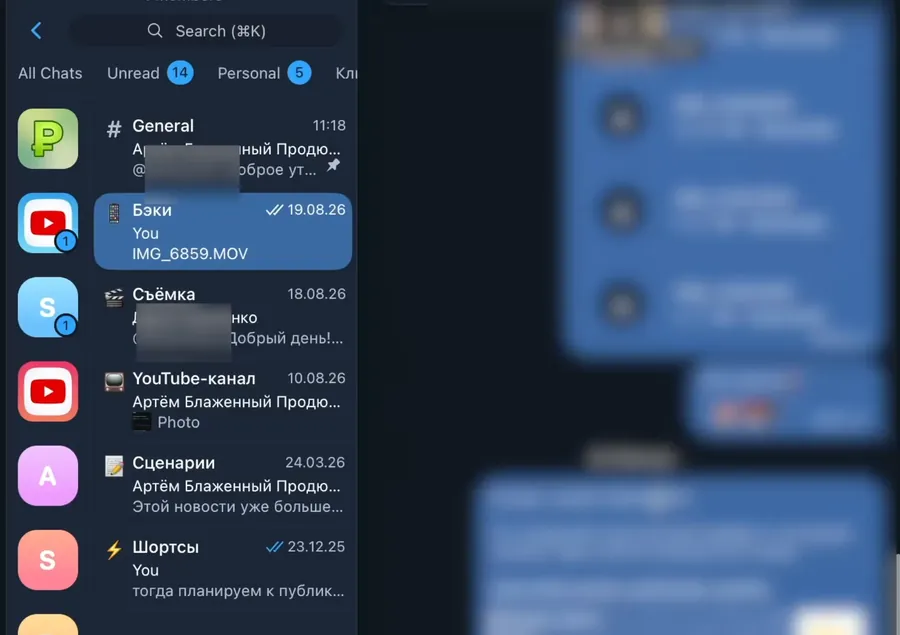
The important info topic is my favorite. When a new person joins, they don't scroll through every chat looking for the brand book. It's all in one place.
And please, don't create a lot of topics. No meme topic, no topic per video. One client has about 30 topics and uses three to five. A topic makes sense when a specific person owns it. Everything else goes to general.
The client sees a simpler version
The client doesn't need to see the back-and-forth of editing. They need the final result. So the client group has a general topic, an important-info topic with every link and file, and, for on-site shoots, a backstage topic with raw photos and videos from set. Clients love it for their stories: they didn't film anything behind the scenes themselves, but our guys did.
A shared space for the whole team
We also have one common team chat. There's a general topic for news, a topic for one-off projects, and a topic for my voice notes. I record 5, 10, 15 minutes of news, and everyone listens when it suits them. Our team is remote and spread out. Someone is sick today, I'm on a shoot, and nobody misses anything.
The main rule: communication happens in public. When I see the team discussing a video in its topic, I know the work is moving. I don't have to ping anyone. Private DMs hide the work, and extra layers of managers translating information slow everything down.
System 2: five calls a month
I hate Zoom calls where you say two words in an hour. I'd rather watch a recording at 1.5x. So every month we have just five calls: four of 20–40 minutes, and one of two hours.
| Meeting | When | What happens |
|---|---|---|
| Weekly sync | Every Friday, 11:00, up to 1 hour | News and well-being, then every project on the board |
| Strategy session | Start of every month, 2 hours | Improve the system: clients, qualification, onboarding, pricing |
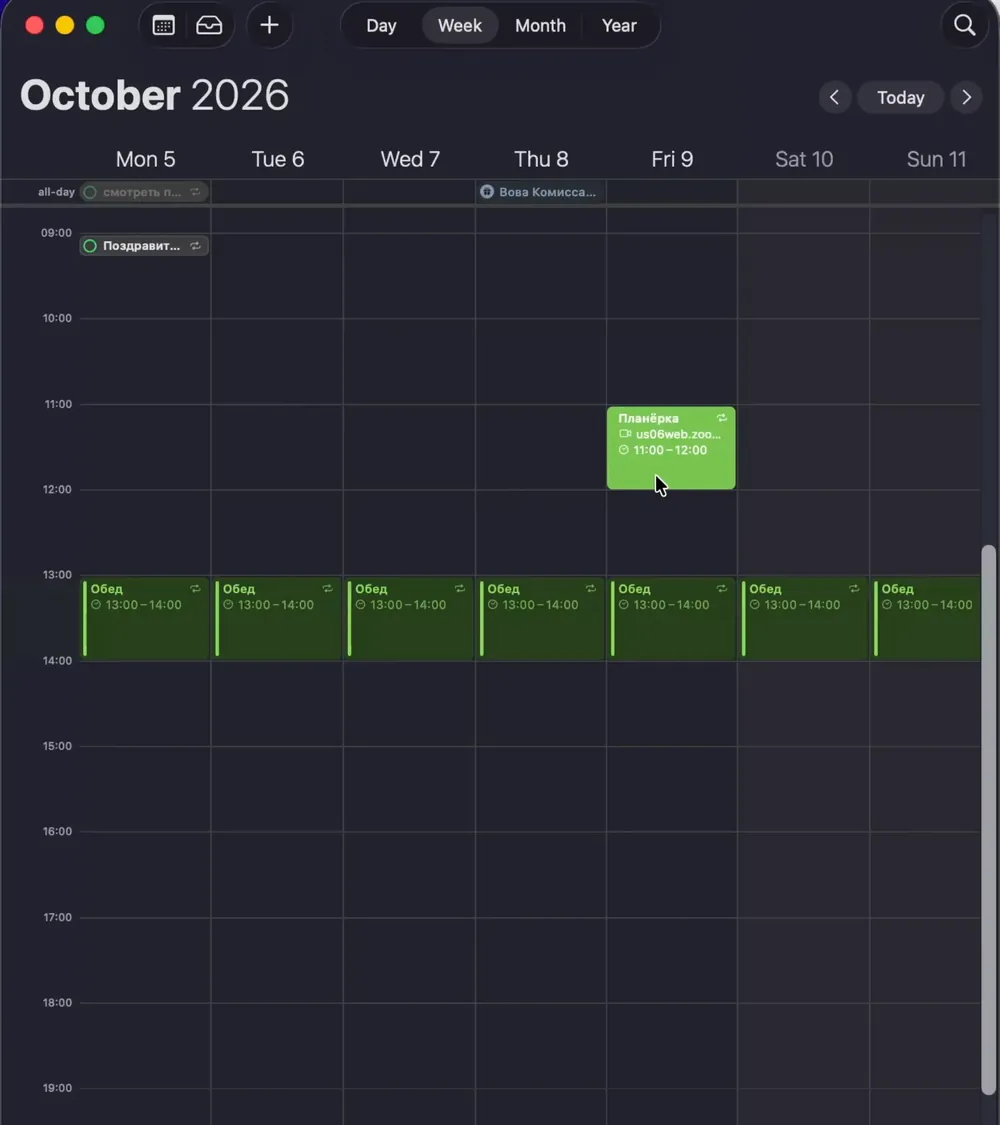
The weekly Friday meeting
I spend 10–15 minutes on news: wins, failures, how everyone is doing. For a remote team, this is the glue. On video you read emotions fast, and if someone seems off, I know I need a one-on-one. Then I hand over to the YouTube producer, who goes through every project for 20–30 minutes: do you need help with this client, any bottlenecks to fix next week?
Two rules make it short:
- People leave when they're done. Someone reports their part in 2–5 minutes, and I say “you can go”.
- Easiest first. We start with the simplest updates and end with the complex problems, so nobody sits through problems that aren't theirs.
Often I'm on a shoot and skip it completely. The producer runs it, and nothing breaks.
Why Friday? On Monday everyone needs to get into the flow first. On Friday you reflect on the week, fix production problems fast, and plan the next one. People rest over the weekend already knowing what they'll edit and in what order. We don't have fixed working hours. Work whenever you want, as long as the video is done by Wednesday.
The monthly strategy session
In operational mode you forget to fix the system. Small bottlenecks pile up because you're busy delivering. So at the start of every month we take two hours to work on the system, not the videos.
I share how the agency grew: new clients, lost clients and why. And one main topic. In September it was moving to the international market: marketing, pricing, what to try. We also looked at the last quarter: we lost several clients, and some were hard to work with. Maybe we need another qualification question, or clearer expectations at onboarding. One client postponed filming several times and slowed everything down.
The key: I don't lecture from the top of the pyramid. I ask questions, and the team answers in a shared doc. “Why do you think this client left?” I might know the answer. But they're in the trenches, they talk to clients and edit the videos. When they figure it out themselves, they accept the goals as their own.
This summer, during a crisis, I cancelled strategy sessions and tried to fix everything myself. Bad idea. I brought them back to boost the team's morale.
System 3: one Notion board where every card is a video
The third system is a Notion database. It's not complicated to build. Every card is one long video, or a pack of about ten shorts. If every short got its own card, it would be a mess: we make several hundred a month. We film in bulk and edit in bulk.
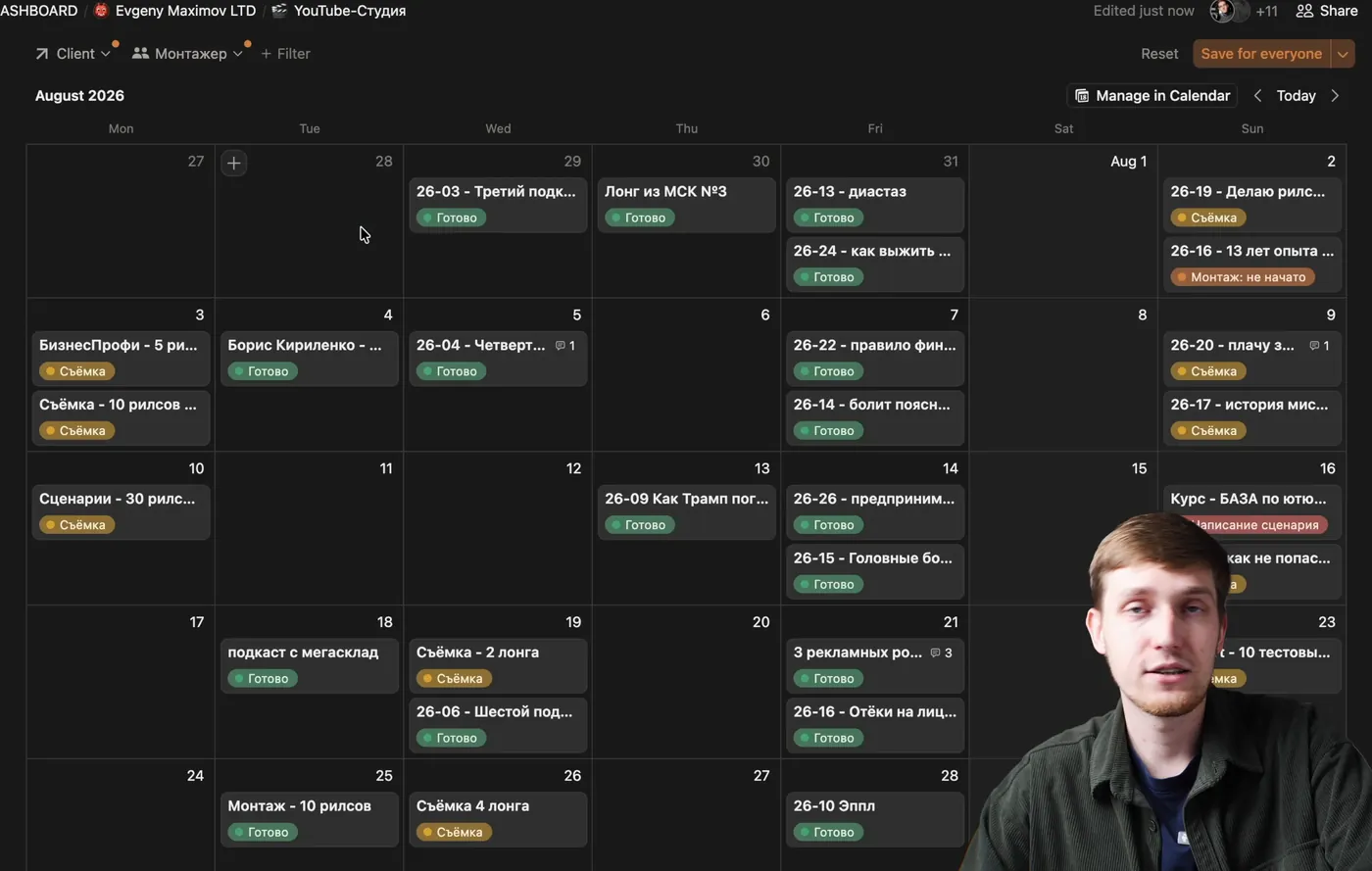
As a founder, I open the board and if it's all green, everything is published. I don't ask anyone about progress. And the team owns the statuses, not me.
Code names instead of titles
We never name cards with the YouTube title. Titles change, especially with A/B testing, when you have three versions. We use a code: the last two digits of the year plus the video number. Video four of 2026 is 26-04. On a shoot we film 26-04, 26-05, 26-06, 26-07. In chat: “Did you edit 26-04?” That's all. Folders use the same codes. Even without Notion, this one habit will speed up your processes.
The statuses
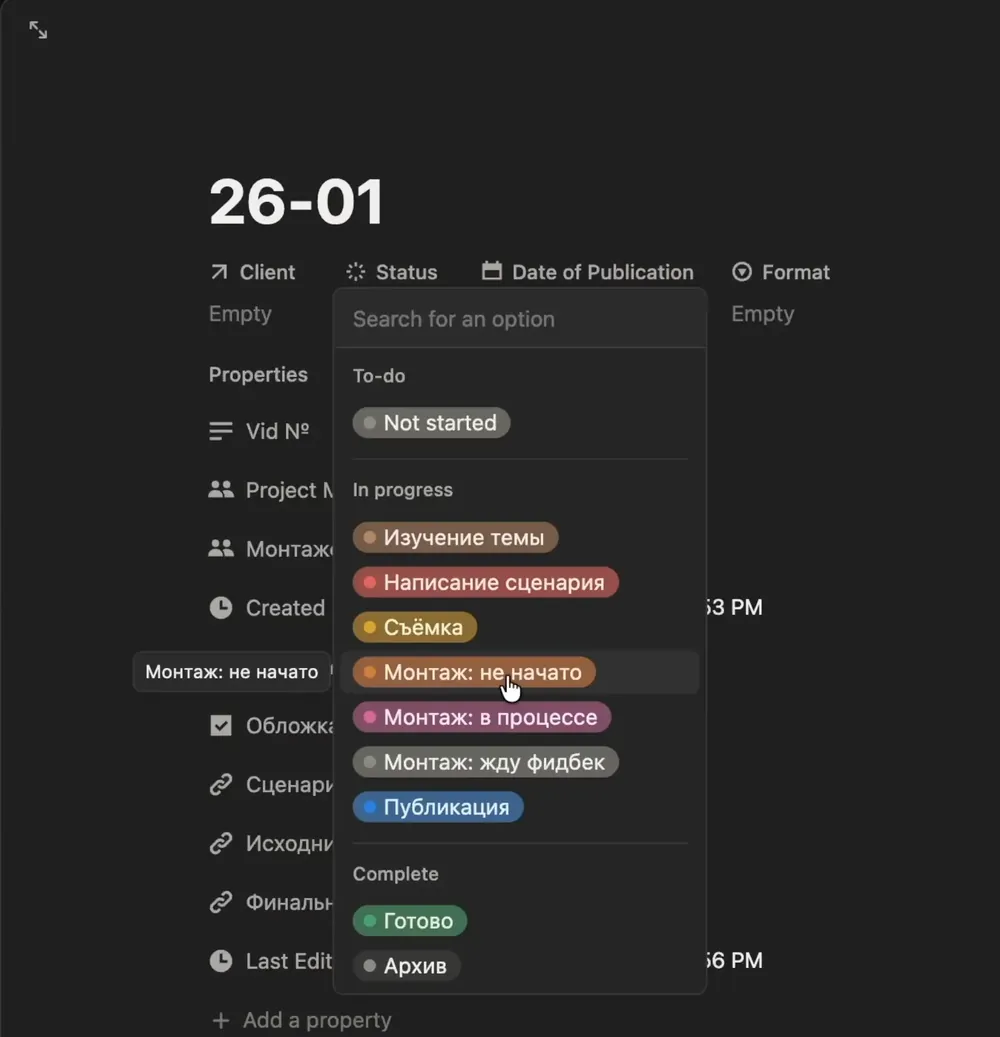
The three editing statuses matter most. With just “done / not done”, you can't tell whether an editor with five projects has started yours. When an edit is done, it goes to review (the producer and quality control) and the editor moves on to the next project while waiting for feedback.
What's on a card
- Client, from a separate client database.
- Date: the publish date, or the filming date for a shoot card. Drag and drop in the calendar.
- Format: long video, shorts, or long video plus clips.
- Project manager: usually the YouTube producer. For small one-off projects, me.
- Editor: we have four, so every card has an owner.
- Three links: the script, the raw footage and the final video. The editor never has to ask the filmmaker for files.
- Comments for specific B-roll or details, with a tag so the editor gets notified.
I cleaned out properties we never used. If you don't filter by it, delete it.
Different views for different people
The bird's-eye view is for me and the producer. Editors don't need every card, so they have their own view: only cards where they're tagged, hiding finished videos and videos still in scripting. They see the calendar and plan: the raw cut by Monday, because the video goes out on Wednesday. In the weekly meeting we just filter by client or by editor.
Super simple to build, super simple to use. No AI automations needed. If you want part three, with cloud storage, onboarding and the tech stack, ask for it and I'll record it.
FAQ
What systems do you need to manage a content team?
Three: one place for communication (we use Telegram group chats with topics), a fixed meeting rhythm (a weekly Friday meeting and a monthly strategy session), and one production board (a Notion database where every card is a video with a status and an owner).
Slack or Telegram for a content team?
Either works. We use Telegram group chats with topics, which work like Slack channels: one topic per role (each editor, design, publishing), a general topic, references, and an important-info topic with every link and file.
How should you organize chats with content clients?
Keep the internal chat separate from the client chat. The client sees a simple group with a general topic, an important-info topic and, for on-site shoots, a backstage topic with photos and videos. All the editing back-and-forth stays internal.
How many meetings does a content team need?
In our agency, five calls a month: four weekly meetings of 20–40 minutes on Fridays and one two-hour strategy session at the start of the month. Everything else happens in chats and voice notes.
Why hold the weekly team meeting on Friday?
On Friday the team reflects on the week and fixes production problems fast, then plans the next week. Over the weekend people already know what they'll edit and in what order. On Monday nobody has to get into the flow from zero.
How do you run a short weekly content meeting?
The founder talks for 10–15 minutes: news, wins, how people are doing. Then the producer goes through every project for 20–30 minutes. Start with the simplest people and let them leave when they're done, so nobody sits through problems that aren't theirs.
What is a monthly strategy session for a content team?
Two hours at the start of the month to improve the system, not the videos: which clients we gained or lost and why, qualification, onboarding, pricing. The founder asks questions instead of giving answers, so the team reflects and owns the goals.
How do you track video production in Notion?
One database where every card is one long video or a pack of about 10 shorts. Each card has a code name, client, status, publish or filming date, format, project manager, editor, and links to the script, raw footage and final video.
What statuses should a video production board have?
Ours: research, scriptwriting, filming, editing not started, editing in progress, editing done and waiting for feedback, publishing, done. The three editing statuses show exactly where each video is without asking the editor.
Why use code names for videos instead of titles?
Titles change, especially with A/B tests. A code like 26-04 (year plus video number) is short, stable and works in chats, folders and the board: “Did you edit 26-04?”
Why keep team communication public instead of in DMs?
When the work is discussed in shared topics, the founder sees progress without pinging anyone, fewer layers translate information, and everyone can see and learn from each other's work.
Founder of a done-for-you YouTube agency for high-ticket founders. Making content since 2014. More about me
Don't want to build these systems yourself?
Our team already runs on them. You film one day a month, remote or on site, and we do the rest. 7-day money back guarantee.
Book a call →