YouTube Systems Setup: The Pipeline, the Channel Settings and the Tracking
Content fails when it depends on your memory. We set up the board, the folders, the channel and the tracking, so videos keep moving and you can see which ones bring leads.
 By Evgeny Maximov·9 min read·
What is included in the setup?
| Part | What you get |
|---|---|
| Content board | A board with every video as a card: owner, publish date, link, status |
| Content plan | A month of topics in a working template, with video code names like 26-04 |
| Communication | A chat space with a topic per role, and an important-info topic with the brand book and links |
| Cloud structure | One folder template for every project, so any editor can pick it up |
| Channel setup | Secure account, branding, description with a call to action, links, upload defaults |
| Publishing checklist | Title, description, chapters, settings, Shorts and cross-posting, one row per video |
| Tracking | A link per video and a simple view of which videos bring leads |
| Standards wiki | How a script looks, how a thumbnail is checked, subtitle style per brand |
How does the content board work?
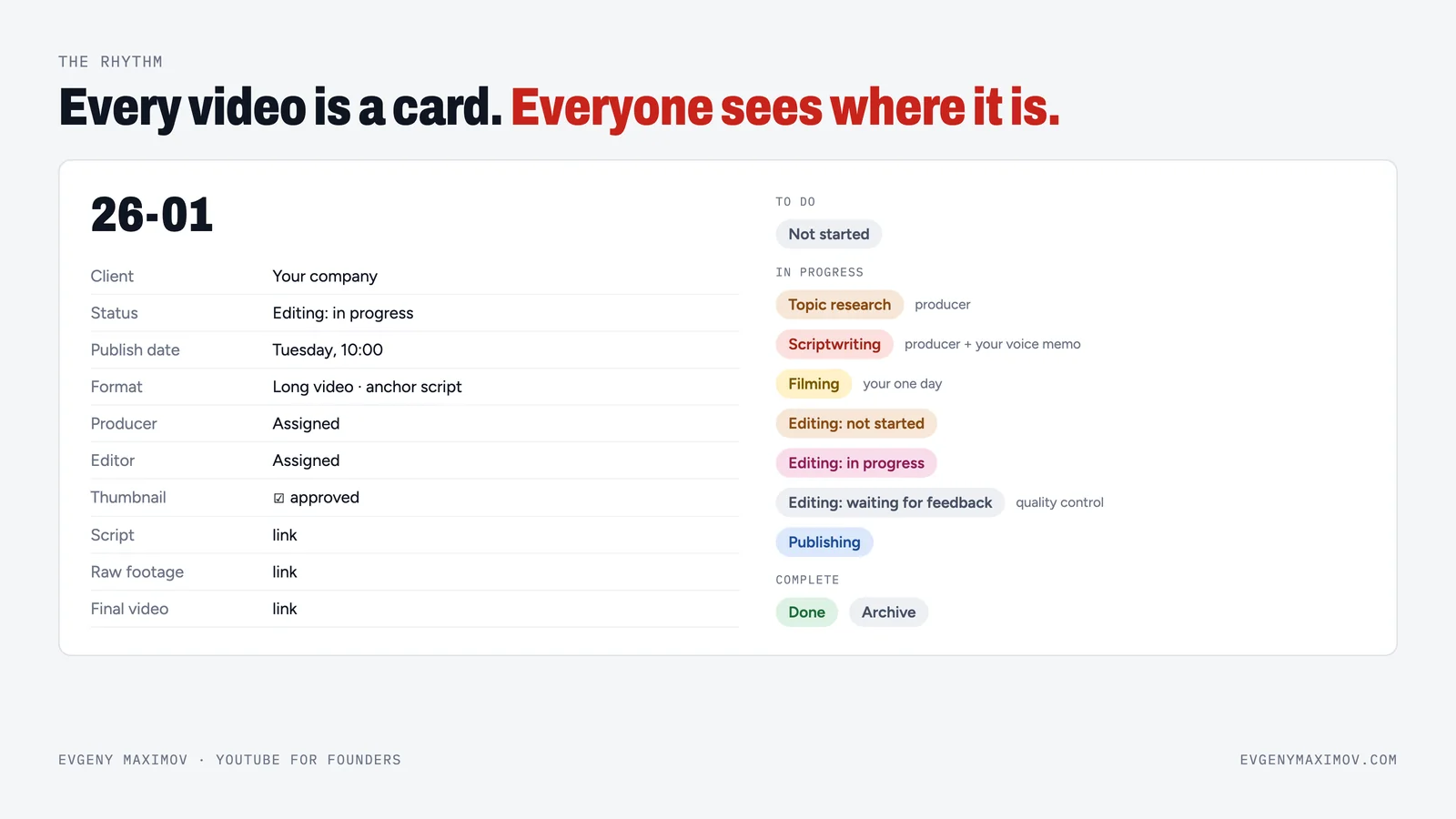
Everything lives on one board. We use Notion. One card is one piece of content, and it moves through the same statuses: research, scriptwriting, filming, editing (not started, in progress, waiting for feedback), publishing, then done or archive. A video editor opens the same board and sees only the projects they need to edit. The founder sees at a glance what is coming and what is waiting for them. No chasing in chats.
How do you keep files and publishing in order?
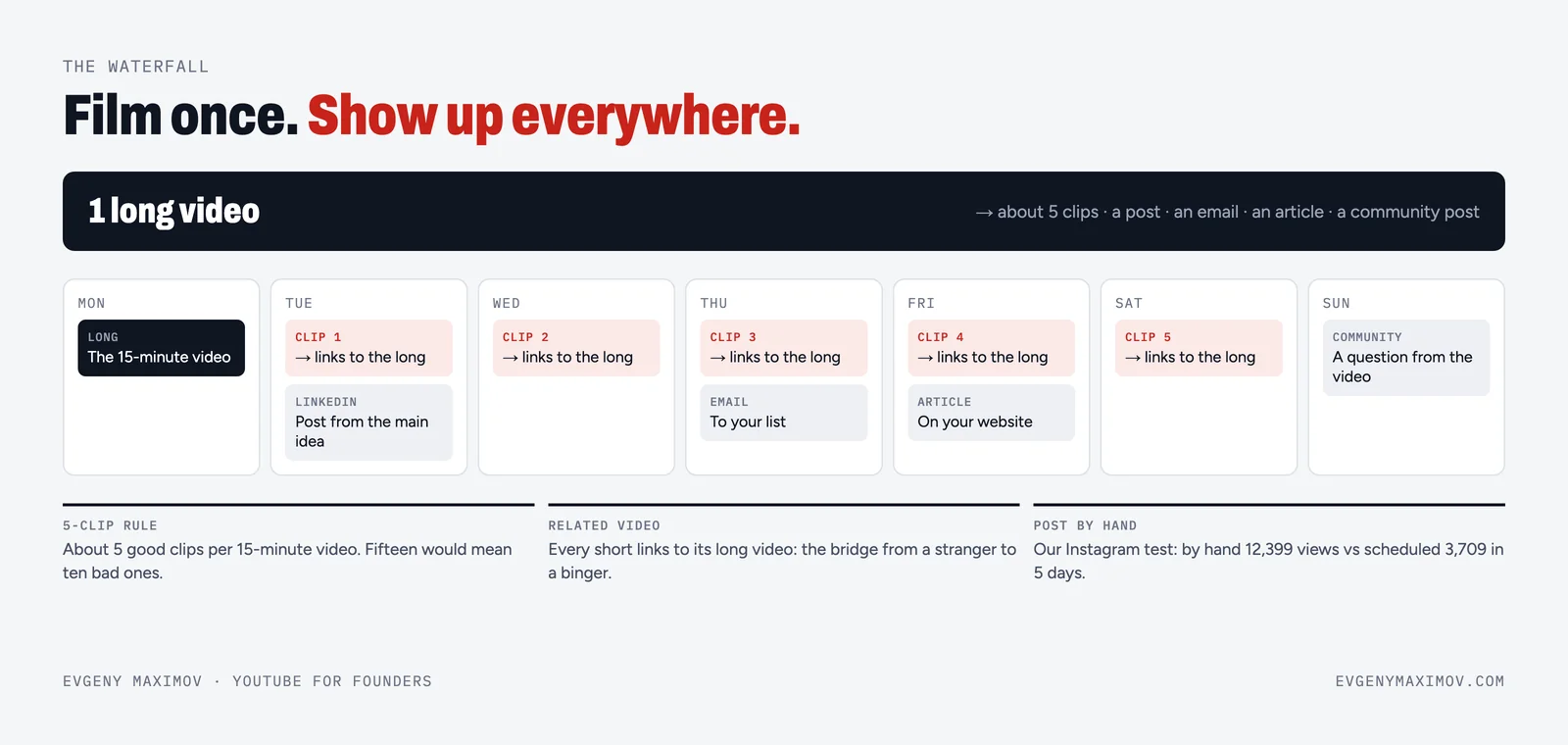
Every project uses the same five folders (video, audio, project, misc and export), and footage lives in the cloud, because without it you can't work with contractors. For publishing we use a simple sheet: one row per video, with the title, the YouTube link, the final video link and a checkbox for each platform. Nothing gets forgotten, and anyone can see what is published where.
How do we set up the channel itself?
- Account. A separate Google account for the channel, a long password and two-factor protection.
- Verification. Phone verification for extended features: videos longer than 15 minutes and custom thumbnails.
- Description. The first line is a call to action, then one to three links, not twenty.
- Upload defaults. The settings that you would otherwise tick for every video: category, audience, tags and a standard description block.
- Branding. A banner and an avatar that tell a new viewer who the channel is for.
How do you know which videos bring clients?
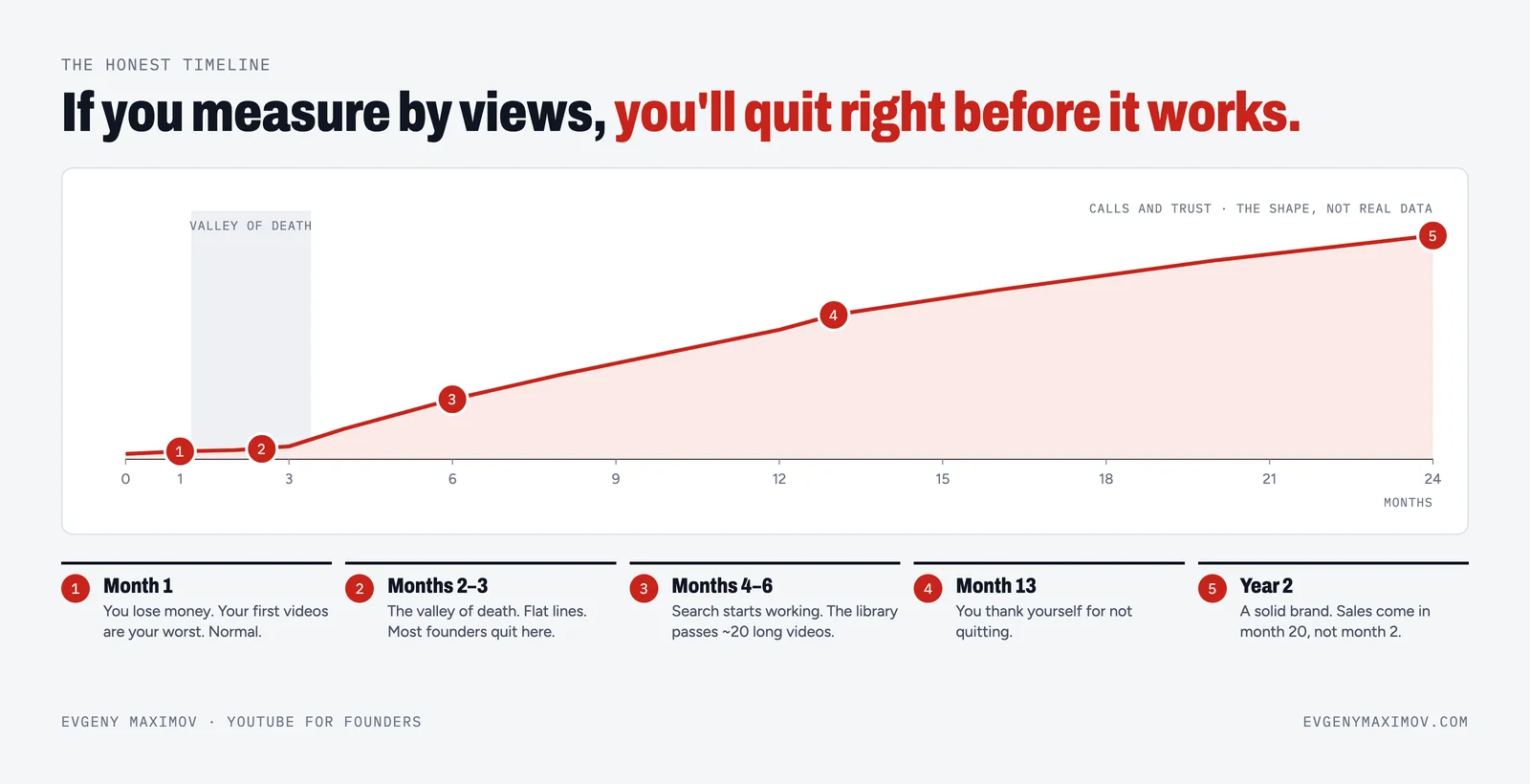
This is the part most channels skip. We give every video its own link, so you see which ones bring calls. My own YouTube descriptions start with the booking link: one idea, one action, before anything else. Then a simple sheet records where each lead came from. After a few months you stop judging videos by views and start judging them by calls and clients. Read our description template for the structure.
Why a system before more videos?
Most channels don't die from bad ideas. They die when the founder is the only link in the chain. A board with clear statuses and an owner for each step is what lets content keep going for a year. The founder gives three things: ideas as voice notes, one filming day a month and quick feedback. The system handles the rest. Read how we think about it in the content operating system.
Combine it with team training, so your people can run it, with a strategy session to decide what to film, or with coaching if you want regular reviews.
FAQ
What do you set up?
A content board with statuses and deadlines, a content plan, a cloud folder structure, channel settings and branding, a publishing checklist, and tracking that shows which videos bring leads.
What tools do you use?
We work in Notion for the board and the content plan, in Telegram groups with topics for communication, and in cloud storage for footage. We can adapt to the tools you already use.
What does the pipeline look like?
Every video is a card with an owner, a publish date and a link. It moves through statuses: research, script, filming, editing (not started, in progress, waiting for feedback), publishing, done or archive. Everyone sees where it is.
What is tracking per video?
Every video gets its own tagged link in the description, so you see which videos bring calls and clients, not only views. We also set up a simple sheet that records leads by video.
Do you set up the YouTube channel itself?
Yes: a separate Google account with a long password and two-factor protection, phone verification for extended features, branding, a channel description whose first line is a call to action, one to three links, and upload defaults.
How long does the setup take?
It depends on scope and how many people are in the system. We agree the plan and the timeline on a call. One-off work starts from $500.
Do I still need a team?
The system needs people to run it. Add team training so your people learn it, or the full done-for-you service so we run it.
Can this be combined with a channel audit?
Yes. The audit shows what is broken. The setup fixes the structure behind it.
Will the system work if I change my editor?
That is the point. Standards written down in a wiki, the same folder structure and one board mean a new editor gets a link, not a lecture.
Founder of a done-for-you YouTube agency for high-ticket founders. Making content since 2014. More about me
Want a system that runs without you chasing it?
Book a call. Before we talk, I review your channel and socials, so you get value even if we don't work together. 7-day money back guarantee.
Book a call →