How to Start a YouTube Channel for Your Business: Step by Step, From Zero to the First 90 Days
Most business channels die in month two. Not because the founder picked the wrong camera, but because they started without a reason, a plan or a rhythm. Here's the order we launch business channels in, from the test you should pass before you spend a dollar to what the first 90 days look like.
 By Evgeny Maximov·10 min read·
Step 1. Should your business start a YouTube channel at all?
Answer five yes-or-no questions. More than three yes, go:
- Are there many potential clients in your market? Not 20 oil company directors.
- Is your market a whole country or the world, not one neighborhood?
- Is your ticket high or your product complex?
- Will you still be in this niche in five years?
- Do you have at least 2–4 years of real experience to talk about?
And one more question I ask every founder: are you ready to invest for months while expecting nothing at first? Content isn't an ad where you put in $100 and see $300 next week. If this is your last money, don't. The full version is in the 5-question business test.
Step 2. How do you set up the account?
- A separate Google account for the channel, a long password and two-factor authentication.
- Phone verification to turn on advanced features: videos over 15 minutes, custom thumbnails, Related video on Shorts.
- The channel name: the company, the founder, or both. For high-ticket services, people trust people, so put a face on it.
- Access for your team by role, never your password. Here's how to add a channel manager.
Already have an old channel in the same niche? Keep it. I revived my own old channel instead of starting over, and the new videos became the most popular on it.
Step 3. What goes on the channel page?
- The first line of the description is a call to action, then who you help and how.
- One to three links: your offer or booking page, plus one more platform.
- A banner with what the channel is about and who it's for.
- A channel trailer for new visitors. Here's how to make it work like a sales video.
- Channel keywords: every version of your name and the main topics.
The full 20-step setup is in YouTube channel optimization.
Step 4. What should you prepare before filming?
Three documents, one evening of work: a quick X-ray of your niche on YouTube, a content plan built from your sales calls, and a checklist for your channel page. The method is in YouTube niche research.
The fastest source of topics: read your last ten sales calls or inquiries and write down the first question each person asked. Price, process, risks, "how do I choose", "what if it goes wrong". Each question is a video.
Step 5. What should your first four videos be?
| Video | Example | Job |
|---|---|---|
| 1. A broad problem | "5 mistakes that make [your thing] fail" | new viewers |
| 2. A price or process question | "What [your service] really costs in 2026" | buyers who are planning |
| 3. A comparison | "[Option A] vs [option B]: what to choose" | buyers who are deciding |
| 4. Proof | a client story, or how you work behind the scenes | trust before the call |
Write one-page scripts with the key points, not word-for-word text. Here's our script template.
Step 6. How do you film them?
All four in one day. Two to four hours of recording, with breaks. A phone, a wireless mic and a soft light are enough at the start. Light and sound matter more than the camera. Ideally someone sits behind the camera and asks you questions. More in batch filming and filming setups by budget.
Step 7. How do you publish?
One long video a week, on a fixed day, plus Shorts cut from it. A title with the phrase your buyers search, a description with the call to action in the first line, chapters, a playlist and an end screen. Our full routine is in the YouTube upload checklist, and the rhythm question is answered in how often a business should post.
What do the first 90 days really look like?
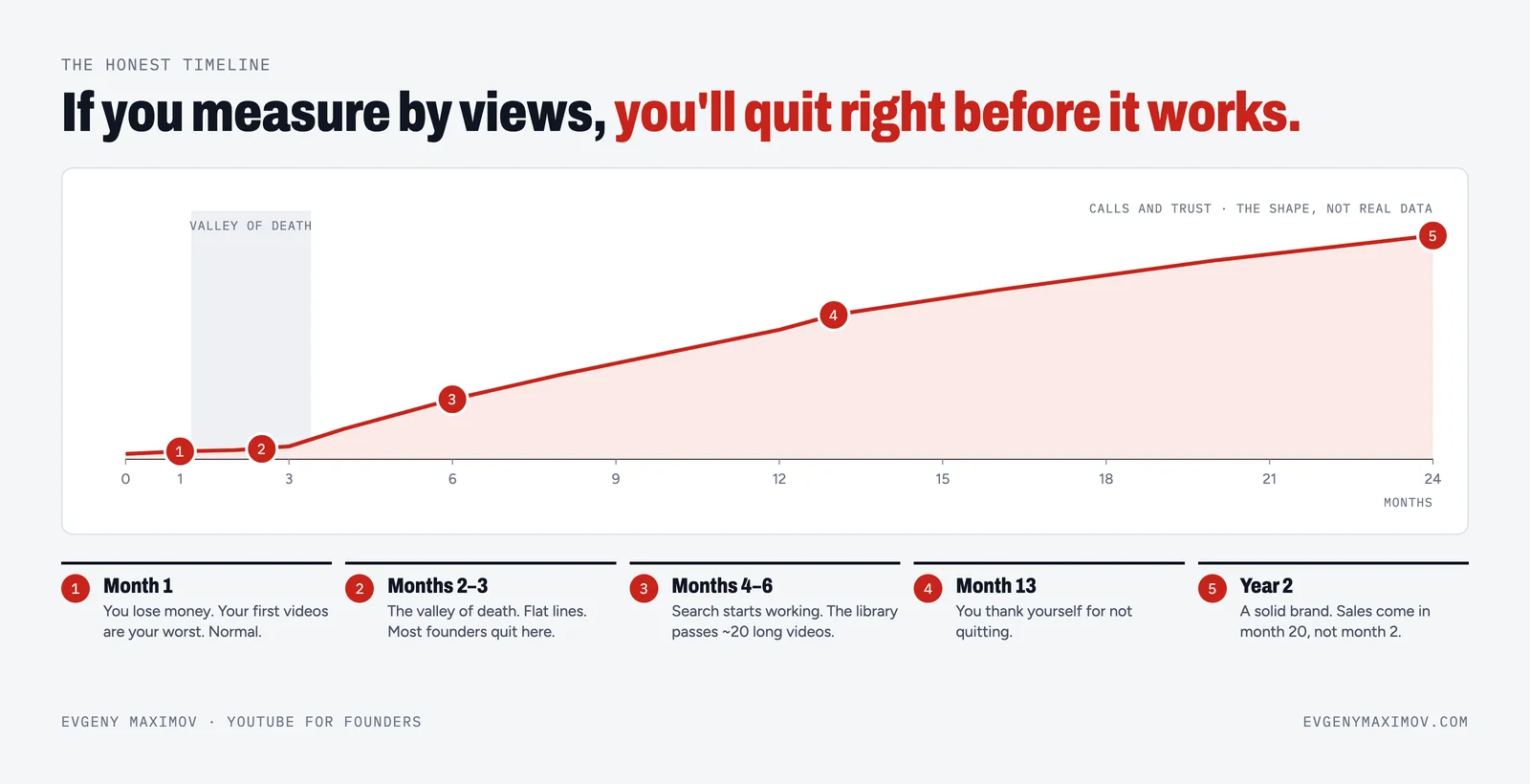
Slow. Small view counts, few subscribers, and the urge to quit in month two. That's normal. Business channels win with the right viewers, not many viewers. One of our clients, a real estate agency, got a lead from a 20-minute video with about 500 views: dry, with numbers and charts. Five hundred of the right people is enough.
So for the first 90 days, measure the rhythm: did you film, did you publish every week, did any lead mention a video? The honest timeline is in how long it takes to grow a YouTube channel.
And if you'd rather have the channel launched for you, from setup to the first month of videos, that's our channel management.
FAQ
How do I start a YouTube channel for my business?
Check that YouTube fits your business, create the channel on a separate Google account with two-factor authentication, verify it with a phone for advanced features, set up the channel page, plan your first four videos from questions your buyers ask, film them in one day and publish on a fixed schedule.
Should a business YouTube channel be under the company name or the founder's name?
For high-ticket services, people trust people, so a founder-led channel usually works better, even if the channel carries the company brand. The founder or a key expert should be the face of the videos.
How many videos should I have before launching a YouTube channel?
Have at least four long videos ready, which is one filming day. That gives you a month of weekly uploads and time to film the next batch without pressure.
How often should a new business YouTube channel post?
About one long video a week, plus Shorts cut from it, is enough for most business channels. Consistency for months matters more than daily posting.
How much does it cost to start a YouTube channel for a business?
You can start with a phone, a $100–200 wireless microphone and a soft light. If you hire help, a done-for-you agency usually costs about $3,000–10,000 a month in 2026; freelance editing is about $100–250 per long video.
How long does it take for a business YouTube channel to bring clients?
Plan for a slow first two to three months. Search usually starts working after a library of videos builds up, around months four to six. Some clients find you earlier, from a video with only a few hundred views.
What should my first business YouTube videos be about?
Answer the questions your buyers ask before they pay: prices, process, mistakes, comparisons, how to choose. List the first questions from your last ten sales calls; each one is a video.
Do I need expensive equipment to start a YouTube channel for my business?
No. Light and sound matter more than the camera. A good phone, a wireless microphone and a soft LED light are enough for the first months.
Should I revive an old YouTube channel or start a new one?
If the old channel is in the same niche, keep it and start publishing again. Evgeny Maximov revived his own old channel instead of starting over, and the new videos became the most popular there.
When should a business not start a YouTube channel?
When you're not ready to invest for months while expecting little at first, when one client is worth very little, or when you won't be in this niche in five years. In those cases events, partners or ads may be a better start.
Founder of a done-for-you YouTube agency for high-ticket founders. Making content since 2014. More about me
Want your channel launched for you?
We set up the channel, plan the first month, film with you in one day and publish. You give about 14 hours a month. 7-day money back guarantee.
Book a call →